SaeeAM Coding

Indian Collage Student Startup Company. Indian Business/Startup provide service and problem solving product

With SaeeAM Team And Doing Projects.

How May I Help You

Latest Blog Posts

How to Setup MERN (MongoDB, Express JS, React JS, and Node JS) Development environment and create your first MERN stack application

How to Setup MERN (MongoDB, Express JS, React JS, and Node JS) Development environment and create your first MERN stack application


Nodejs Install 

https://nodejs.org/en/download

Mongodb Install and setup online and localhost both

Mongodb atlas online setup database

https://www.mongodb.com/atlas/database

Download Mongodb into window system

https://www.mongodb.com/try/download/community  


Setup Backend and Frontend 

  1. Create folder for backend and frontend
  2. npm init -y
  3. "type": "module"

Install package for backend

Mongoose and expressjs

npm install express mongoose --save

Create file for database db.js

import mongoose from 'mongoose'

const connectDB = async () => {
    try {
        //database Name
        const databaseName='demomern';
        const con = await mongoose.connect(`mongodb://127.0.0.1:27017/${databaseName}`, { 
        useNewUrlParser: true,
        useUnifiedTopology: true,
        useCreateIndex: true
    });
        console.log(`Database connected : ${con.connection.host}`)
    } catch (error) {
        console.error(`Error: ${error.message}`)
        process.exit(1)
    }
}

export default connectDB

Create file server.js and import database configuration

import connectDB from './backend/config/db.js'

connectDB()

Create model directory and create datamodel.js

import mongoose from 'mongoose'

const userSchema = mongoose.Schema({
    firstName: {
        type: String,
    },
    secondName:{
        type: String,
    },
    userName: {
        type: String,
        required: true,
        unique:true
    },
    email: {
        type: String,
        required: true,
        unique:true
    },
    password: {
        type: String,
        required: true
    },
    isAdmin: {
        type: Boolean,
        required: true,
        defualt: false
    },
}, {
    timestamps: true
})

const User = mongoose.model('User', userSchema)

export default User

Create json dummy data to store on database 

[{
"_id": {
"$oid": "5fd21021d230812954b4b49a"
},
"firstName": "Manish",
"lastName": "Mandal",
"userName": "Manntrix",
"email": "admin@gmail.com",
"password": "asdfg123",
"isAdmin": true
},{
"_id": {
"$oid": "5fd21f60d230812954b4b49b"
},
"firstName": "John",
"lastName": "Doe",
"userName": "Johndoe",
"email": "johndoe@gmail.com",
"password": "asdfg123"
},{
"_id": {
"$oid": "5fd21f82d230812954b4b49c"
},
"firstName": "Demo",
"lastName": "test",
"userName": "Demo",
"email": "demo@gmail.com",
"password": "asdfg123"
}]

Create controller folder in backend and usercontroler.js file create

import User from '../models/usersModel.js'
import asyncHandler from 'express-async-handler'

//getUsers function to get all users
export const getUsers = asyncHandler(async(req, res) => {
    const users = await User.find({})
    res.json(users)
})

//getUserById function to retrieve user by id
export const getUserById  = asyncHandler(async(req, res) => {
    const user = await User.findById(req.params.id)

    //if user id match param id send user else throw error
    if(user){
        res.json(user)
    }else{
        res.status(404).json({message: "User not found"})
        res.status(404)
        throw new Error('User not found')
    }
})

Create route folder and into create routeuser.js

import { getUsers, getUserById } from "../controllers/userController.js";
import express from 'express'
const router = express.Router()


// express router method to create route for getting all users
router.route('/').get(getUsers)

// express router method to create route for getting users by id
router.route('/:id').get(getUserById)

export default router

Install

npm i dotenv --save

Import

import dotenv  from 'dotenv'dotenv.config()

Create .env file in root folder

NODE_ENV = development
PORT = 5000

Create server.js in root folder 

import connectDB from './backend/config/db.js'
import userRoutes from './backend/routes/userRoute.js'
import express from 'express'
import dotenv  from 'dotenv'

//connect database
connectDB()

//dotenv config
dotenv.config()

const app = express()

//Creating API for user
app.use('/api/users', userRoutes)

const PORT = process.env.PORT || 5000

//Express js listen method to run project on http://localhost:5000
app.listen(PORT, console.log(`App is running in ${process.env.NODE_ENV} mode on port ${PORT}`))

Install

npm i nodemon --save-dev

Now add this line under the scripts object inside the package.json file.

"start": "nodemon backend/server.js"

17. Create a react project with the name frontend.

npx create-react-app frontend

18. Install Axios into your react application.

npm install axios --save

19. Now replace all the code from the app.js file with the below-mentioned code.

import React, {useEffect, useState} from 'react'
import axios from 'axios'

const App = () => {
  const [users, setUsers] = useState([])
  const getData = async() => {
    const res = await axios.get('/api/users')
    setUsers(res.data)
  }

  useEffect(() => {
    getData()
  }, [])
 
  return (
    <div>
      {users.map(u => <h4 key={u._id}>userName : {u.userName}</h4>)}
    </div>
  )
}

export default App

Before starting our react application add the below line inside the package.json file of the react project or else you will receive a CORS error in your project.

"proxy": "http://127.0.0.1:5000",

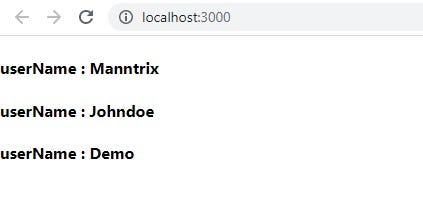
20. Now start the application npm start and refresh the browser to see changes.

So now we have successfully built our first MERN project.


React Introduction

React Introduction


   Tutorial Video 

what is react

React is a JavaScript library for building user interfaces. It is maintained by Facebook and a community of individual developers and companies. React can be used to create single-page applications, mobile applications, and complex user interfaces.

Topics

Topics related to React include:
- Components - Props - State - Hooks - Virtual DOM - JSX - Performance Optimization - Styling Components - Testing React Apps - Accessibility in React Apps - Server Side Rendering with React.js

React Syntax 

import React from 'react';
import ReactDOM from 'react-dom';

ReactDOM.render(<h1>Hello World!</h1>, document.getElementById('root'));


Next - React Installation 


Google Cloud Platform - Today Sign up $300 in free credits for new customers.

Google Cloud Platform - Today Sign up $300 in free credits for new customers

Run workloads for free

20+ free products for all customers

All customers get free hands-on experience with popular products, including Compute Engine and Cloud Storage, up to monthly limits

$300 in free credits for new customers

New customers get $300 in free credits to fully explore and conduct an assessment of Google Cloud. You won’t be charged until you upgrade.

Additional free credits for businesses

New customers who verify their business email will get additional free credits to use while exploring and evaluating Google Cloud.

Explore more free trial offerings from Google Cloud

OFFERKEY BENEFITS
Looker Free Trial

Create a 30-day Looker trial instance with all standard features at no cost.

  • Connect to data in 50+ different databases

  • Build and manage centralized data models

  • Access and analyze your trusted data

Cloud Spanner Trial

Create a 90-day Spanner free trial instance with 10 GB of storage at no cost.

  • Unlimited scale

  • Up to 99.999% availability

  • High availability with zero scheduled downtime

Contact Us